
Connect Your Systems. Automate Your Evidence.
How Sigmify GRC turns everyday system activity into audit ready proof.
Sigmify GRC's Secure Integration Gateway connects to the systems you already run, including SIEM, HRM, cloud platforms, and more, and turns their events, logs, and workforce data into control status, tickets, and audit ready evidence.
Foundations
Two Feeds, One Control Set
SIEM systems bring the technical and security side of your environment: events, logs, and alerts. HRM systems bring workforce and personnel data tied to access, roles, and organizational change. Sigmify GRC ingests both and correlates them against the same set of controls.
Foundations
The Full Connector Library
The same Secure Integration Gateway also connects log management and monitoring tools, cloud platforms, endpoints, and infrastructure layers. SIEM and HRM are two of the categories below, and every connector works the same way.
| Category | What It Feeds | Example Use in Sigmify GRC |
|---|---|---|
| SIEM platforms | Security events, logs, and alerts, filtered to the use cases you choose | Access controls, threat detection, and incident response are working as designed |
| HRM systems | Joiner, mover, and leaver records, roles, and reporting lines, mapped to your own role structure | Access is granted, changed, and revoked in line with role changes and exits |
| Log management and monitoring tools | System and application logs from the applications you select | Activity is recorded and reviewed continuously, between audits as well as during them |
| Cloud platforms | Configuration settings and activity records | Cloud resources stay securely configured and data protection controls stay in place |
| Endpoints | Device health and security agent status | Devices are protected and running the required security tools |
| Infrastructure layers | Network and platform-level events | Baseline infrastructure controls hold over time |
Every custom connector runs through the same Secure Integration Gateway, with the same encryption, audit trail, and health monitoring as the rest.
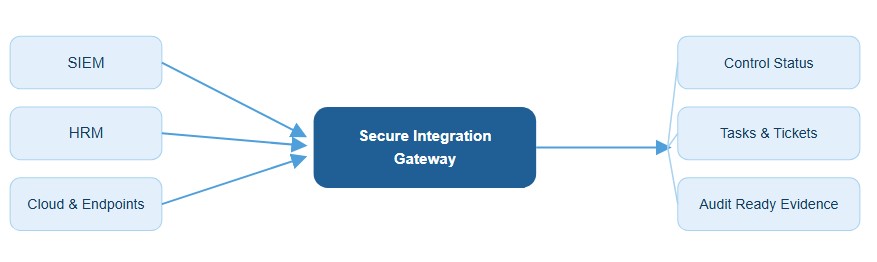
Every source system flows through one gateway, which turns raw activity into control status, tickets, and evidence you can hand an auditor.
Why It Matters
Complete, Current, and Audit-Ready
Every System, One Program
A compliance program is only as complete as what feeds it. Sigmify GRC connects to cloud services, security tools, backup systems, SIEM, and HRM through preconfigured connectors, so events, logs, and workforce data flow into compliance automatically. Most connections go live in days, without custom development.
Always Current
Each control syncs on the schedule it needs: daily, weekly, or in real time. Control status updates as new data arrives, so your dashboard shows what’s true today, and evidence is ready whenever an auditor asks for it.
Logged, Versioned, Traceable
Every synced data point, sync event, and connector change is logged securely, version-controlled, and mapped to the controls, audits, and exceptions it supports. Your audit trail is the record the system was already keeping, so nothing has to be pieced together after the fact.
Problems Surface on Their Own
Routine events update control status quietly in the background. When data points to a control failure, risk, or anomaly,
Sigmify GRC opens a task, alert, or exception ticket automatically. If a connector fails, a token expires, or a sync stops, your team is alerted right away, long before it turns into an audit finding.
How It Works
The Sigmify GRC Approach
Secure in Both Directions
Sigmify GRC exchanges data with SIEM, HRM, and other enterprise applications through the Secure Integration Gateway. Encrypted, authenticated API connections protect data as it moves in both directions between your GRC workflows and the tools you already use.
Where an Offboarding Event Closes the Loop
Incoming data is mapped to the controls, policies, and objectives it relates to, and events from different systems are correlated to confirm those controls actually work. When someone is offboarded, for example, the HRM exit record is matched against the corresponding SIEM access log to validate the access-revocation control. The policy said access should be revoked, and now there’s proof it was.
Evidence That Builds Itself
System logs, scan outputs, and operational data sync into Sigmify GRC automatically. Each piece of evidence is captured as it arrives and linked directly to the controls, audits, and compliance activities it supports, so there’s nothing to collect by hand when an audit comes around.
Status That Never Goes Stale
As new data arrives, the status of every linked control updates on its own. Controls that pass are marked effective with their evidence attached, and controls that fail are flagged, so your team knows exactly where to look.
How It Works
Value Delivered
Days, Not Development Cycles
Sigmify GRC connects to SIEM and HRM tools through preconfigured connectors, so you’re ingesting security events, logs, and alerts for continuous monitoring in days, not after months of custom development.
Signal, Not Noise
Not every event needs a human’s attention. Routine events quietly feed control status and evidence collection in the background. But when integration data points to a control failure, risk, or anomaly, a task, alert, or exception ticket is created automatically, so the events that matter never get lost in the noise.
A Broken Connector Doesn’t Stay Quiet
Integration health monitoring keeps watch around the clock and flags failures, expired tokens, or sync issues the moment they happen. A broken connector becomes something your team can act on immediately, not a silent gap you discover during an audit.
Every Exchange, Logged and Traceable
Every data exchange, sync event, and connector change is logged in detail and kept in line with your SIEM and HRM records, supporting audit requirements and giving you a traceable history whenever you need it.
Stay ahead of the IRDAI 2026 guidelines
Know how Sigmify GRC's IRDAI compliance software helps you stay compliant — including the 6-hour incident reporting deadline and DPDP alignment requirements.